As a freelancer, keeping track of your income, expenses, and taxes is essential. Accounting software helps you automate bookkeeping, reduce errors, and prepare for tax season. In this guide, we compare the best accounting tools for freelancers worldwide – from free options to full‑featured platforms.
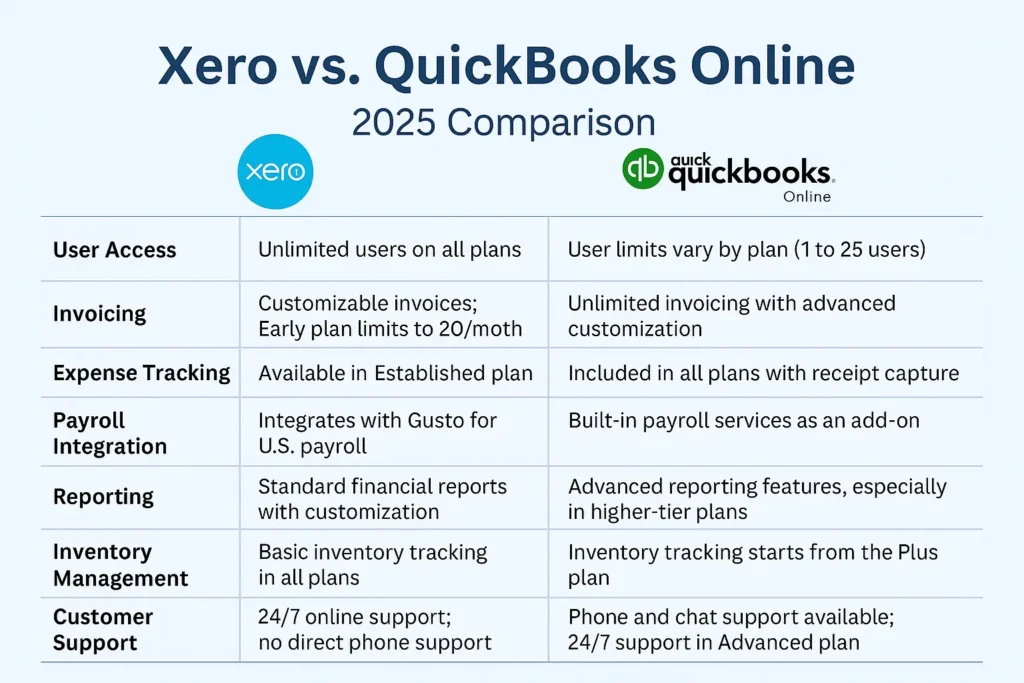
Quick Comparison
| Tool | Best for | Free plan | Starting price (monthly) | Key feature |
|---|---|---|---|---|
| Wave | Freelancers just starting out | ✅ Yes (free accounting) | $0 | Free + unlimited invoices |
| Zoho Books | Freelancers with up to 50 clients | ❌ No (30‑day trial) | $15 | Automation + client portal |
| FreshBooks | Service‑based freelancers | ❌ No (30‑day trial) | $19 | Easiest to use |
| QuickBooks Self-Employed | Freelancers needing full accounting + tax | ❌ No | $15 | Automatic tax calculation + mileage tracking |
| Xero | International freelancers (multi‑currency) | ❌ No | $13 | Multi‑currency + strong reporting |
Wave – Free Accounting for Beginners
Wave is completely free for accounting and invoicing (payment processing fees apply). It's perfect for freelancers who are just starting out and need basic bookkeeping. Available in the US, Canada, and several other countries. It includes bank reconciliation, profit & loss reports, and sales tax tracking.
Zoho Books – Affordable and Feature‑Rich
Zoho Books offers a generous 30‑day free trial and plans starting at $15/month. It includes automation (recurring invoices, payment reminders), client portals, and integration with Zoho CRM. Ideal for freelancers with up to 50 clients.
FreshBooks – The Easiest to Use
FreshBooks is widely regarded as the most user‑friendly accounting tool for freelancers. It handles time tracking, expenses, client communication, and project management. The mobile app is excellent. Perfect for service‑based freelancers (designers, writers, consultants). Plans start at $19/month.
QuickBooks Self-Employed – Accounting + Tax
QuickBooks Self-Employed is designed specifically for freelancers who need to separate business and personal finances. It automatically tracks income and expenses, calculates estimated taxes, and tracks mileage (for US users). Plans start at $15/month.
Xero – For International Freelancers
Xero is a powerful accounting platform that supports multiple currencies, making it ideal for freelancers with clients around the world. It offers robust reporting, bank reconciliation, and a wide range of integrations. More complex than FreshBooks, but more powerful. Plans start at $13/month.
How to Choose the Right Tool
- If you have very few transactions and zero budget → Wave (free).
- If you need automation and client portals → Zoho Books or FreshBooks.
- If you want the easiest experience → FreshBooks.
- If you need full accounting and tax calculations → QuickBooks Self-Employed.
- If you work with international clients (multiple currencies) → Xero.
Tips for Choosing Your Accounting Software
- Take advantage of free trials (most offer 14‑30 days).
- Check if the tool supports your local tax regulations (e.g., VAT, GST, sales tax).
- Make sure it integrates with your bank or payment gateway (Stripe, PayPal).
- Choose a tool that allows you to scale (add more clients, projects, or team members) without changing platforms.
Conclusion – Start Managing Your Finances Like a Pro
The right accounting software will save you hours each month and help you stay on top of your taxes. Start with a free plan or trial, and upgrade as your business grows. The key is to find a tool that fits your workflow and gives you confidence in your numbers.
Get started for free:
Wave (free) →
Zoho Books (free trial) →
FreshBooks (free trial) →
QuickBooks Self-Employed →
Xero (free trial) →